EHR Integrations can make a major difference in how efficiently healthcare staff move through their day. When systems communicate properly, employees spend less time switching between platforms, re-entering information, tracking down notes, or waiting on another department to provide information that already exists somewhere else.
The issue usually isn’t that the information is missing.
It’s that staff have to work too hard to get to it.
One growing healthcare organization I work with had teams handling scheduling, home health visits, laboratory-related calls, and patient communication across multiple locations. As the organization grew, staff needed faster access to information without adding more manual steps.
The Information Was Already There
Before the systems were connected, staff often moved between platforms to find patient notes, review lab details, schedule the next step, and document the interaction.
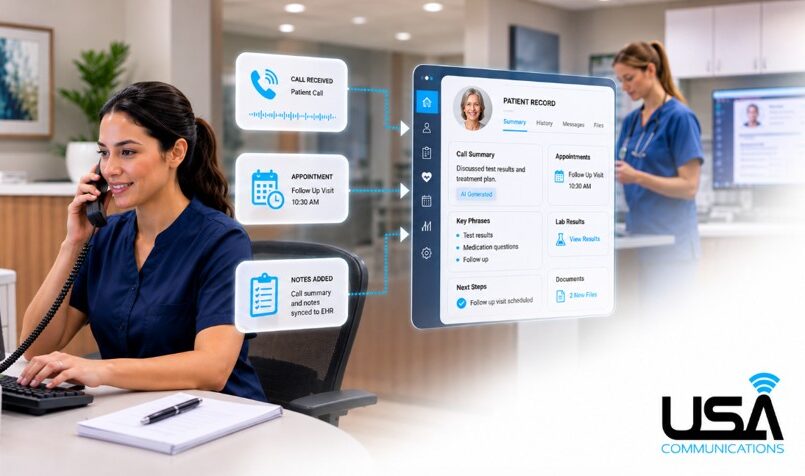
The organization integrated its EHR with its phone and contact center environment so authorized staff could access patient information while handling the call.
The integration worked both ways. Staff could review patient notes, document the interaction in the calling system, and have those notes sync back into the EHR automatically.
Employees outside the contact center could then see the updated record without anyone entering the same information twice.
AI Can Help Capture Details Staff Might Otherwise Miss
The organization also added AI tools to help capture information during calls.
The system could summarize conversations and identify details based on key phrases or required questions within the staff script. Those summaries could then be added back into the EHR for authorized employees and managers to review.
Before this workflow, staff had to remember to document information manually across systems, which meant details could be forgotten or entered late.
Managers could also review the AI-generated summary first and return to the call recording only when more detail was needed.
AI-assisted scheduling and basic patient interactions were also used where appropriate, while keeping a live-human option available.
The goal was not to replace staff. It was to make the systems around them handle more of the repetitive work.
The Right Integrations Look Different for Every Practice
Not every healthcare organization needs the same integrations, and not every practice needs to connect everything at once.
A better starting point is understanding what your current EHR can connect to, which workflows create the most administrative burden, and what can realistically be improved first.
Sometimes that means a larger project. Sometimes it means starting with one process, such as scheduling, call notes, patient reminders, or access to lab information.
Compliance Still Has to Be Part of the Conversation
Healthcare integrations require careful planning because making information easier to access does not mean making it available to everyone.
Patient data still needs to be protected, and access should be based on what employees actually need to perform their role. The systems involved should also be evaluated for security, compliance, and how information is transferred and stored.
The right integration should reduce administrative work without creating unnecessary compliance or patient-data exposure.
Common EHR Integrations That Can Reduce Administrative Work
- EHR + Phone / Contact Center
Staff can access relevant patient information while handling calls without constantly switching systems. - Call Notes + EHR Documentation
Employees can document an interaction in the calling system and have those notes sync back into the EHR. - AI Call Summaries + EHR
AI-generated summaries can capture what happened during the call and make those notes available to authorized staff and managers. - AI Key-Phrase / Script Tracking
The system can identify important phrases or required questions and help capture details that may otherwise be missed. - Scheduling + EHR
Appointment and home health scheduling can use the same patient information instead of requiring staff to re-enter details. - Lab Results + Patient Communication
Authorized staff can access relevant information more efficiently while speaking with patients.
Other common integrations can include online scheduling, business texting, appointment reminders, telehealth platforms, patient portals, referral systems, and billing or insurance platforms.
The goal is not to connect every system simply because you can, but to identify where staff are losing time, duplicating work, or missing information and use the right integrations to remove those barriers.
Start by Looking at Repetitive Work and Missing Data
One of the easiest ways to identify integration opportunities is to look at where repetitive work happens and where important information is commonly missed.
Ask yourself or your staff:
- Where are we entering the same information more than once?
- Where are employees switching between systems to complete one task?
- What information do staff commonly forget to document or frequently miss?
- Where are patients being asked to repeat information we already have?
- What work could be automatically captured, summarized, or transferred between systems?
Those are often the places where an integration can make the biggest difference.
Start With a Technology Assessment
If your staff regularly switches between systems, re-enters information, or spends time searching for information that already exists somewhere else, it may be worth looking at how your current platforms work together.
A Free Technology Assessment can help identify where integrations may reduce administrative workload and where your existing systems could work more efficiently together.
If several of the workflows above sound familiar, that is exactly the type of conversation we can have during an assessment.
The goal is not to add more technology. It is to make the technology you already rely on work better for your staff, your patients, and the way your organization operates today.