
01
Assess Your Current Environment
- Which patient calls are getting missed or delayed?
- How do different locations, front desks and teams communicate?
- What is working, and what does your current system make difficult?
USA Communications | Healthcare & Dental
Use this healthcare communications selection guide to compare patient call routing, secure connections, EHR integrations and support for your medical or dental practice. Follow eight practical checkpoints, test real workflows and download the branded evaluation checklist.
Start with patient access, staff workflows, privacy and continuity. These eight checkpoints help you compare options on practical requirements instead of long feature lists.
01

02

03

04

05

06

07

08
Use the eight-point worksheet below to discuss needs with your team and compare providers. It is available to print or save as a PDF from your browser.
The details below help clarify the decisions that most often affect deployment, patient access and ongoing support.
A business phone system is a fit for calling, transfers, business messaging and everyday routing. Evaluate a contact center when you need multiple queues, agent-status visibility, supervisor functions, detailed reporting and more complex workflows.
Document your patient call flow first, including overflow, call backs, urgent calls and after-hours handoffs. Test representative scenarios rather than relying only on a demo. See Business Phones (UCaaS) and Contact Center (CCaaS).
A vendor’s integration list does not prove that the exact EHR version or workflow you need is supported. Confirm the specific API, required licenses, supported fields, data access, authentication, setup fees, and who maintains the connection.
A screen-pop, click-to-call function, appointment request and bi-directional data exchange are different promises. Put requirements in writing and review Software Integrations before signing.
Review any creation, receipt, storage or transmission of protected health information with your privacy and security teams. Determine applicable vendor agreements and the responsibilities of each party. A signed BAA alone does not certify an entire solution.
Use a risk-based review of user access, retention, recordings, logs, encryption, incident response and backup plans. Read HHS Security Rule guidance and HHS Cloud Computing guidance.
Start any AI receptionist or automation project with a limited routine use case, a live-staff fallback and a way to monitor mistakes. Ask how sensitive information is handled and who can update the assistant.
Cloud communications also depend on connectivity and power. Test how calls reroute during outages, how staff continue to operate, and which provider owns recovery. See AI Receptionist, SD-WAN, and Disaster Recovery.
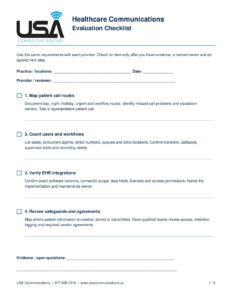
Download Healthcare Communications Checklist (PDF) Open PDF to print
Two-page worksheet from USA Communications. Call 817-608-7319, visit www.usacommunications.us or schedule a free technology assessment.
Published references help support the general security and risk-management concepts. Our buyer questions reflect practical technology advisory experience, not endorsements of particular vendors.
Privacy, compliance, legal and clinical decisions remain the responsibility of the relevant qualified teams. No platform or vendor agreement alone guarantees HIPAA compliance. Image: Vitaly Gariev / Unsplash.
Review your current communication workflows with USA Communications, then compare suitable providers, implementation responsibilities and ongoing support.

Practical technology guidance for your business, from comparing options to coordinating the next steps.
Call or text 817-608-7319
Email Us
© 2026 USA Communications. All rights reserved.