
USA Communications | Buying Guides
SMB Technology Buying Guide
A practical guide for small and medium businesses comparing internet, phones, Wi-Fi, security and everyday business tools.
This SMB technology buying guide helps you turn everyday business needs into clear questions for providers. Use the printable checklist to record evidence, compare full costs and assign next steps before you make a decision.
A clear starting point for growing businesses
You do not need a large IT department to make an organized technology decision. Start with the services your team relies on, identify what is causing friction and compare suppliers against the same real-world tests. This guide applies across industries; if you have specialized workflows, pair it with your industry buying guide.
1. Start with your business workflows
Write down the work that technology needs to support: customer inquiries, appointments, payments, file sharing, remote work and day-to-day operations. Count people, locations and devices. Separate must-have requirements from useful extras, and give each requirement an owner.
Ask each provider: Which of our workflows are included in your proposed scope, and how will we test them before accepting service?
2. Compare internet, backup service and Wi-Fi
Ask providers to confirm service availability at your exact address. Compare expected capacity, equipment, installation dates and support responsibilities. Review Wi-Fi coverage in the places people actually work, including meeting rooms and customer areas. A backup connection is useful only when staff understand what stays available and how switching works.
Ask each provider: Can we test primary-service failure and see which applications remain usable?
3. Choose business phones and customer messaging
Walk through a real customer call from greeting to resolution. Test transfers, voicemail, overflow, after-hours routing and mobile access. Confirm number portability, business texting registration and consent requirements, opt-outs and who handles missed inquiries. Choose the features staff will use instead of comparing feature lists alone.
Ask each provider: What happens when no one answers, a staff member works remotely or our main internet connection stops?
4. Review security, accounts and backups
Inventory business accounts, devices and important information. Clarify responsibility for multi-factor authentication, updates, employee access changes and backup checks. Ask your qualified IT or security team to review proposed controls and service boundaries. Record what the provider manages and what remains your responsibility.
Ask each provider: Who removes access when an employee leaves, and when was a sample file last restored from backup?
5. Verify software integrations and AI tools
Use your actual CRM, email, scheduling and payment workflows in demonstrations. Confirm supported software versions, permissions, connector fees and maintenance ownership. If you consider AI assistants, define suitable tasks, data handling rules, accuracy review and a clear handoff to a person. Start with a small pilot and measurable acceptance criteria.
Ask each provider: Can you demonstrate our exact workflow and show what happens when the integration or assistant cannot complete it?
6. Compare total costs and contract terms
Use the same planning period for every quote. Include users, numbers, equipment, installation, licenses, training, support and backup service. Ask about introductory pricing, renewals, taxes, term commitments, cancellation charges and ownership of numbers and data. Record assumptions so a low opening price does not hide later costs.
Ask each provider: Which costs can change, what triggers an additional charge and what will leaving the service require?
7. Plan implementation and ongoing support
Name a project owner and agree on milestones, staff training, number ports and acceptance tests. Confirm a rollback plan before cutover. Keep a contact list showing who handles phones, connectivity, devices and software. Review the first month of operation against the goals you set at the beginning.
Ask each provider: Who coordinates an issue involving multiple vendors, and how will we escalate a service interruption?
Download the SMB technology checklist
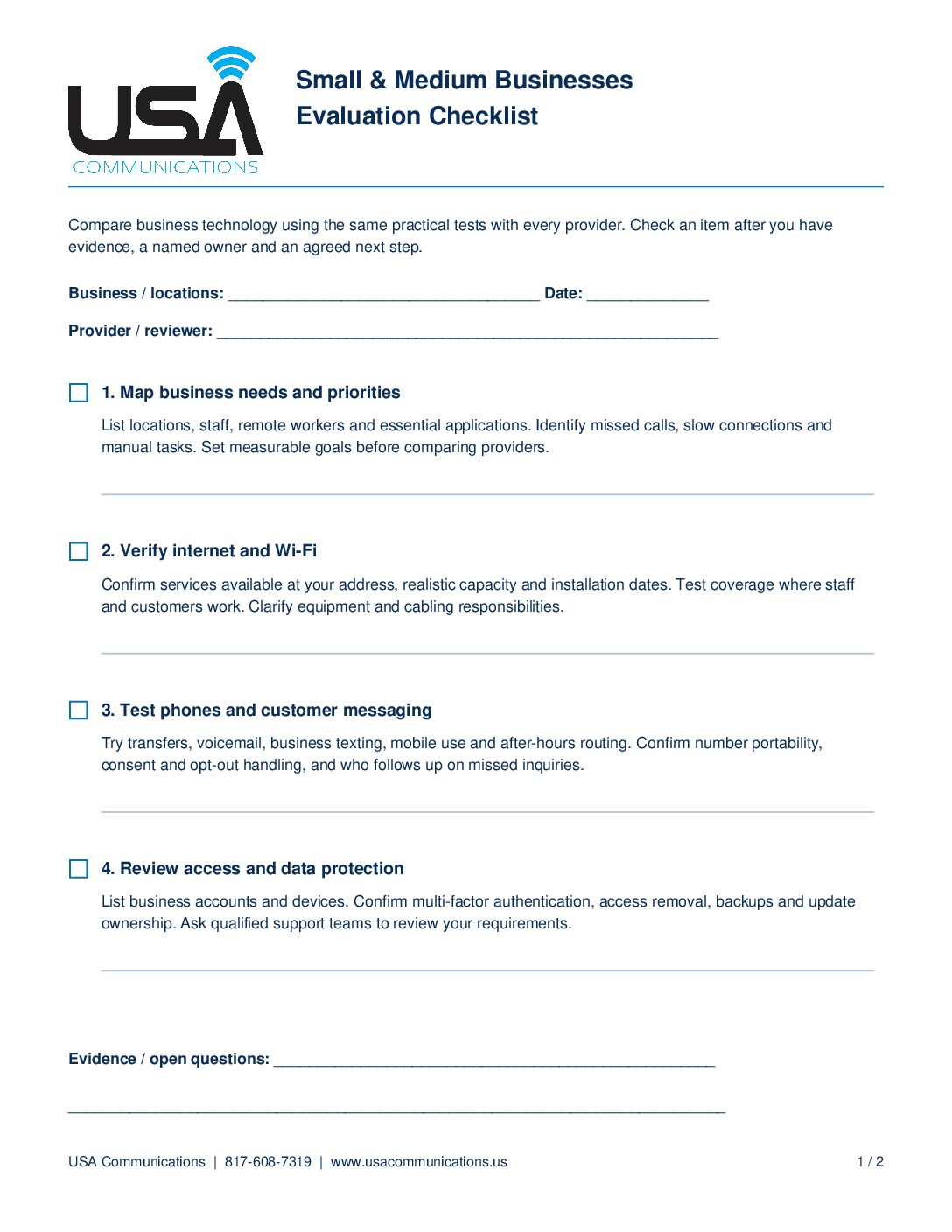
Bring this two-page worksheet to your next vendor meeting. It includes eight evaluation areas, space for open questions and a place to record the decision, owner and target date.
Download SMB Technology Checklist (PDF) Open PDF to print
Two-page worksheet from USA Communications. Call or text 817-608-7319, visit www.usacommunications.us or schedule a free technology assessment.
SMB technology buying guide: common questions
Where should a small business start?
Start with your critical workflows and current problems. Document the people, devices and locations involved, then choose a few measurable outcomes to test with every provider.
Should we replace every service at once?
Build a phased plan around dependencies, renewal dates and disruption. A pilot can reveal training or integration gaps before a wider rollout. Confirm who owns each phase and how you can reverse a cutover if needed.
How can USA Communications help?
USA Communications can help organize requirements, compare suitable provider options and clarify implementation and support responsibilities. Schedule a free technology assessment or explore a telecom bill review to begin the conversation.
For additional security planning resources, visit the NIST Small Business Cybersecurity Corner. This planning guide supports provider evaluation. Verify each supplier’s scope and terms in writing, and use qualified teams to review requirements specific to your business.